Create and manage tenants
A tenant is a separate space with its own users, apps, keys and audit log. Read Organizations and tenants for what that means; this page is about doing it.
You need to be an owner or an admin of the organization to create, suspend, archive, restore or delete tenants.
Create a tenant
Section titled “Create a tenant”- Open Tenants and choose Create tenant.
- Fill in:
- Name: shown in the dashboard and in emails, for example
Staging. - Slug: the short name used in addresses, for example
staging. No other tenant of your organization may have it, but other organizations may use the same slug. It cannot be changed later. - Contact Email, Timezone and Locale.
- Where the data lives: leave it on This installation to keep the tenant in the installation’s own database.
- Name: shown in the dashboard and in emails, for example
- Choose Create Tenant.
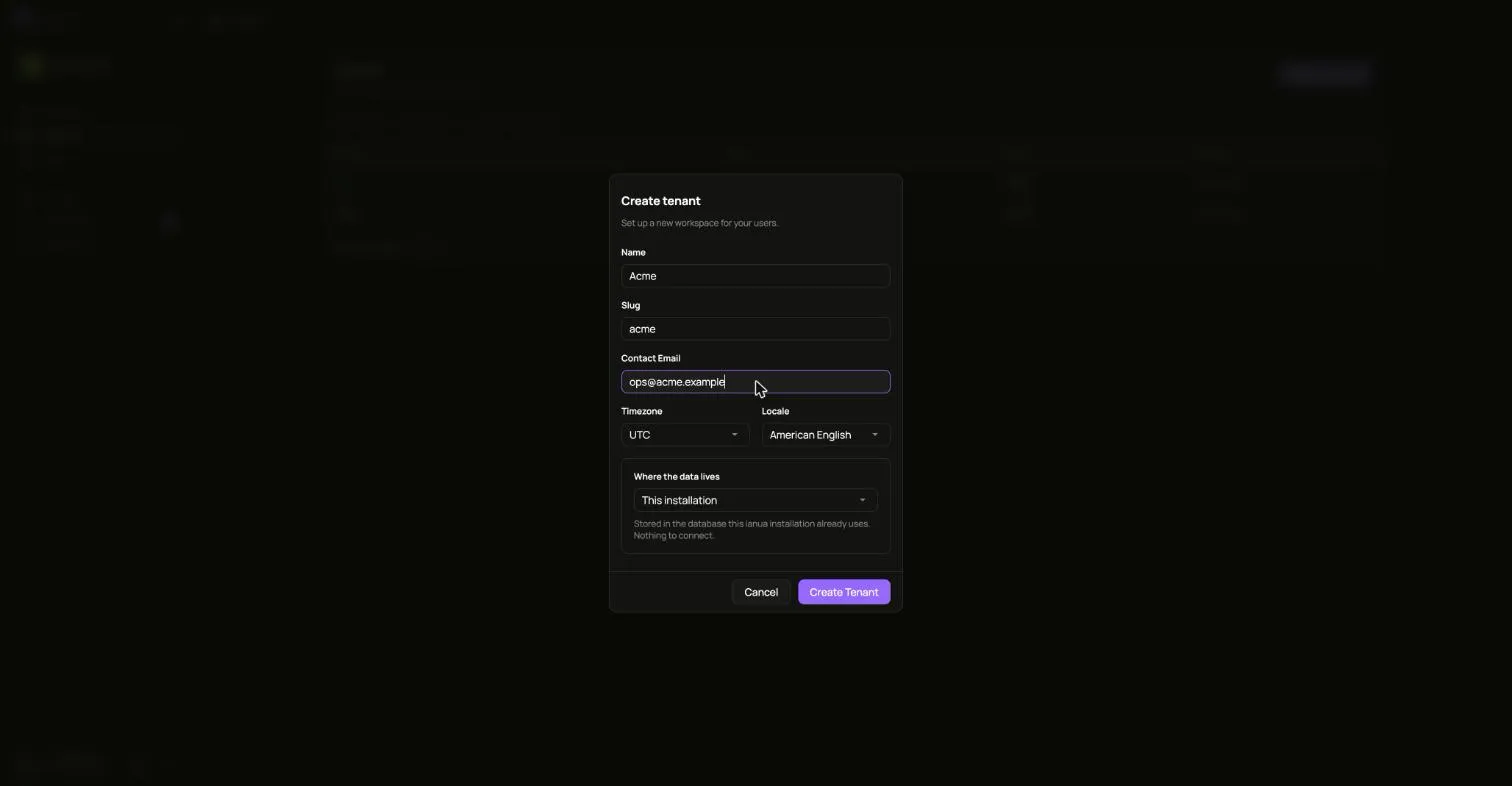
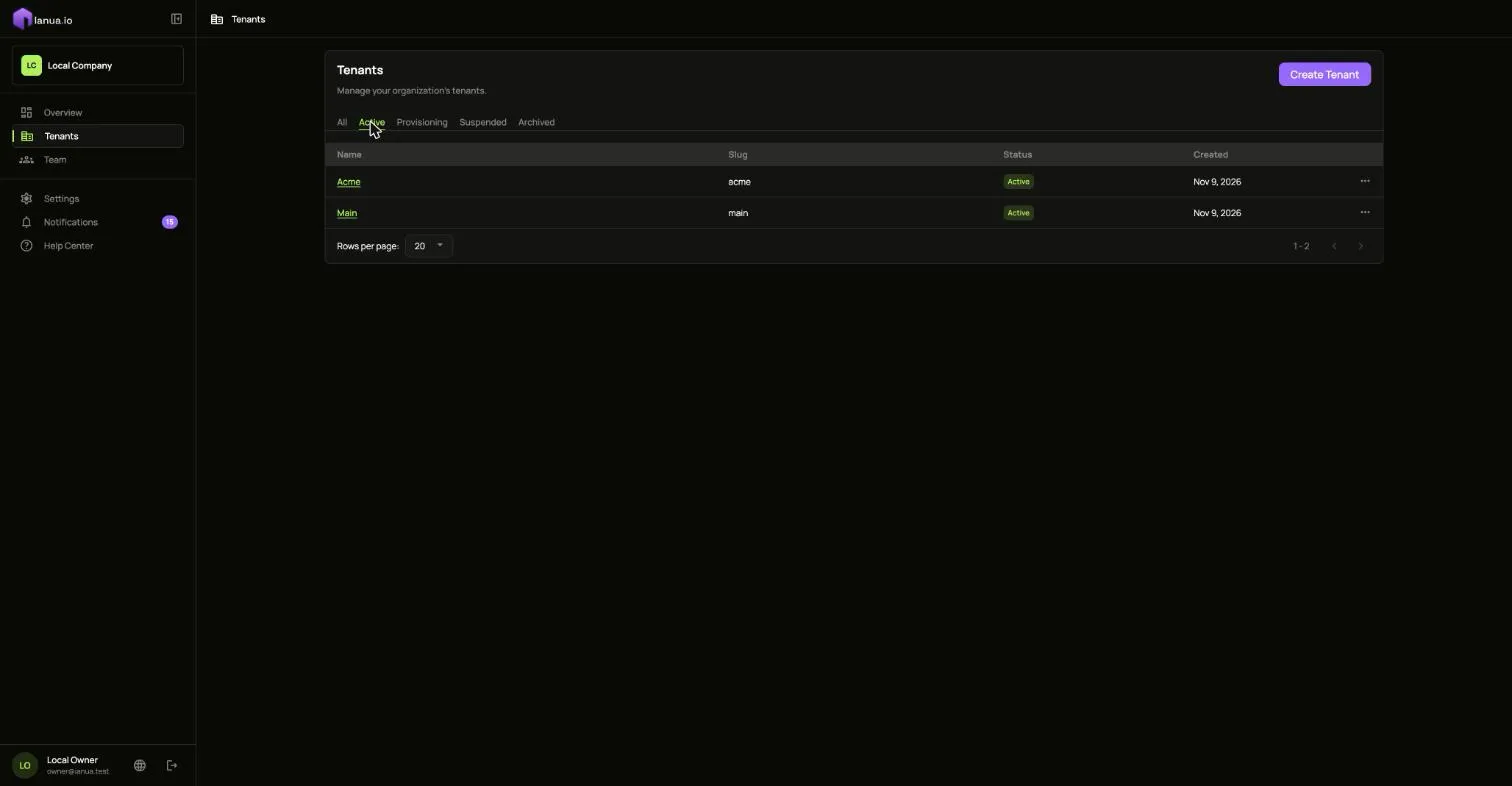
The tenant starts as Provisioning while ianua creates its default roles, its sign-in settings and its signing keys. After a few seconds it becomes Active, and you can open it.
A new tenant has no domain of its own. Add one once the tenant exists: it is proved first, and then it can be made the tenant’s primary domain.
Shared or dedicated schema
Section titled “Shared or dedicated schema”By default a tenant’s rows sit in the same tables as every other tenant’s, each one tagged with its tenant, and the database itself refuses to show one tenant’s rows to another. If you want a tenant’s tables kept physically apart as well, create it with a dedicated schema: its own set of tables inside the same database.
This choice is made once, at creation. The dashboard currently creates shared tenants; to create one with a dedicated schema, use the API (below).
Change its details
Section titled “Change its details”Open the tenant, go to Settings, and edit its name, contact email, timezone, locale or primary domain under General. The slug stays as it is.
Suspend, archive and delete
Section titled “Suspend, archive and delete”A tenant moves through the statuses shown in a tenant’s life. Its menu in Tenants, and the Danger zone in its Settings, offer what fits its current status:
| Status | What you can do |
|---|---|
| Active | Suspend, or Archive |
| Suspended | Restore Access, or Archive |
| Archived | Restore it, or once 30 days have passed, Delete forever |
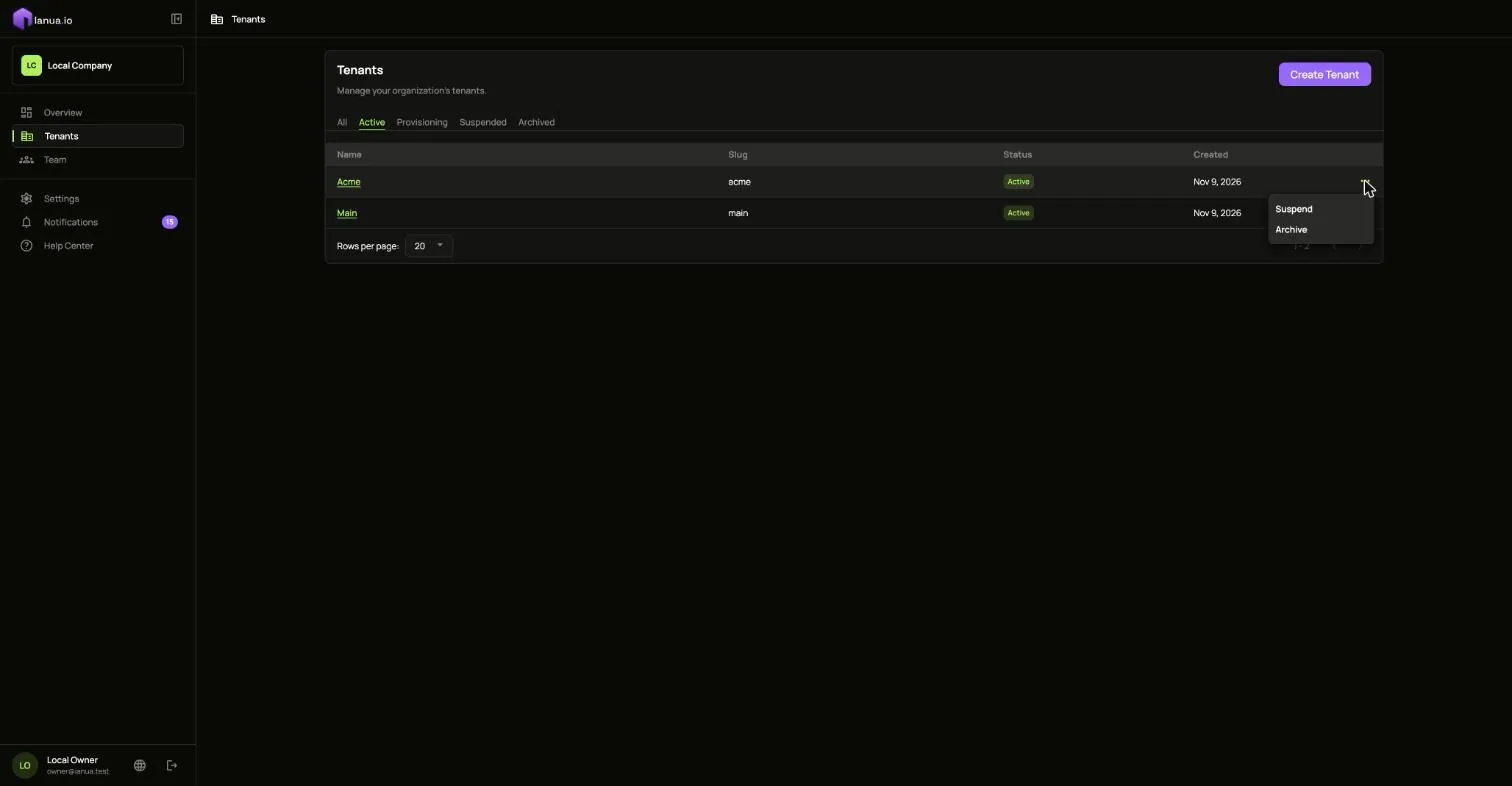
- Suspend when something is wrong and everything must stop now: every session ends, nobody can sign in, and the gateway stops serving the tenant’s apps. Nothing is lost, and Restore Access brings it all back.
- Archive when you are done with a tenant. It stops working as with suspending. For 30 days you can restore it, and it comes back as Active. Deleting it is refused until those 30 days have passed.
- Delete forever closes the tenant irreversibly and queues removal of its operational data. Its audit records remain in the organization’s audit log and exports, for owners and admins, until their retention expires. Dedicated storage is removed after the retained trail is safe. There is no undo.
The gateway follows each change within moments, without a restart.
With the API
Section titled “With the API”Sign in as an owner, as in the API quickstart:
API=https://api.ianua.localhost/api/v1TOKEN=$(curl -sk -X POST $API/login \ -H 'Content-Type: application/json' \ -d '{"email":"you@example.com","password":"Violet otters juggle 42 brass lanterns at dusk"}' | jq -r .refresh_token)auth=(-sk -H "Authorization: Bearer $TOKEN" -H 'Content-Type: application/json')ORG=$API/organizations/acmeCreate a shared tenant:
curl "${auth[@]}" -X POST $ORG/tenants -d '{ "slug": "staging", "display_name": "Staging", "contact_email": "you@example.com", "timezone": "UTC", "locale": "en-US"}'Create one with a dedicated schema instead, by adding where its data lives:
curl "${auth[@]}" -X POST $ORG/tenants -d '{ "slug": "billing", "display_name": "Billing", "contact_email": "you@example.com", "timezone": "UTC", "locale": "en-US", "residency": { "kind": "platform", "isolation": "DedicatedSchema" }}'Rename it, then suspend, reactivate, archive and restore it:
curl "${auth[@]}" -X PATCH $ORG/tenants/staging -d '{"display_name":"Staging (EU)"}'curl "${auth[@]}" -X POST $ORG/tenants/staging/suspendcurl "${auth[@]}" -X POST $ORG/tenants/staging/reactivatecurl "${auth[@]}" -X POST $ORG/tenants/staging/archivecurl "${auth[@]}" -X POST $ORG/tenants/staging/restoreEach answers 204, or 422 when the tenant’s status does not allow the step. Delete an archived tenant once its 30 days have passed; before that, the answer is 409:
curl "${auth[@]}" -X DELETE $ORG/tenants/stagingList your tenants and their status:
curl "${auth[@]}" $ORG/tenants | jq '.items[] | {slug, status}'